Original: $12,698.00
-70%$12,698.00
$3,809.40The Story
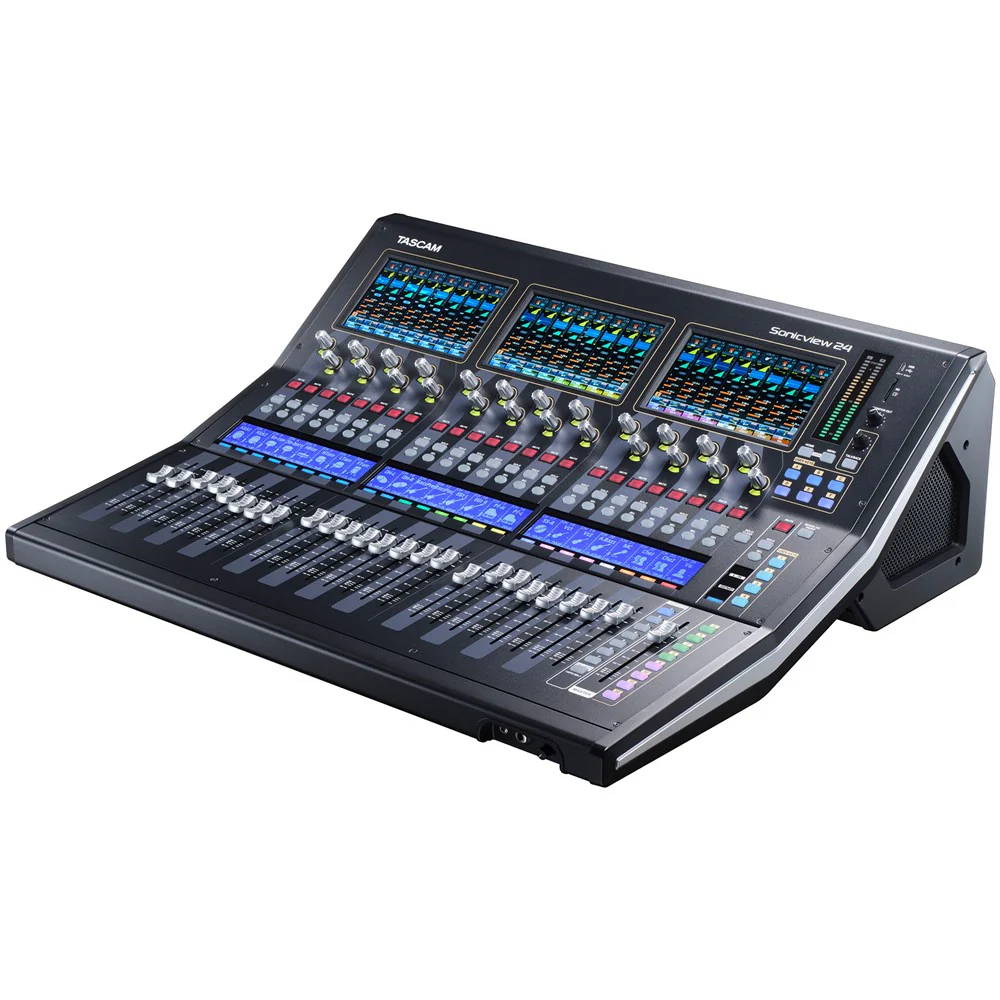
Tascam 24 Channel Digital Recording/Mixing Console
Tascam has a long history of high-quality digital mixers, culminating with the legendary DM-4800, a workhorse mixer that set a new standard. With Tascam Sonicview, Tascam has created an entirely new line of digital mixing consoles that incorporate the latest technology and make it easy to see and control all of the parametres you want, when you want, with completely customisable touch screens and user-definable buttons, along with motorised faders and intuitive control software.
Tascam Sonicview mixing consoles integrate beautifully with the rest of your system, thanks to built-in Dante networking, a 32-bit/96 kHz multi-channel USB audio interface, and plenty of I/O. No-compromise audio quality, including 54-bit float-point FPGA mixing, combines with ample signal processing, an expansion slot for additional connectivity, and wireless remote control to make Tascam Sonicview mixers a next-generation choice for touring, installed sound, recording studios, and broadcasting.
Intuitive Operation at Your Fingertips
The Tascam Sonicview 24 offers motorised channel faders in three banks of eight, plus a motorised stereo fader for the main bus. Above each bank of channel faders is a colour touch panel that allows you to view entire mixer channels, or get down to details, controlling each parametre with your fingertip.
The Amazing View
Truly the next generation in mixer user interfaces, the powerful intuitive Tascam Visual Interactive Ergonomic Workflow (View) system lets you quickly and easily configure the Tascam Sonicview 24's three touch screens.
Thanks to the View user interface, there are three different ways to view your settings, and each touch screen can be configured independently, so you can monitor and control any combination of settings you want, in whichever screens you want, whenever you want. For instance, you could monitor levels for eight channels of vocals on screen 1, while tweaking the parametric EQ on a drum submix in screen 2 and keeping an eye on the output-bus level and compression curve on screen 3.
To view the status of any eight adjacent channels at a glance, as you would see on vertical channel strips with an analogue mixer, choose Channel Strip View.
In Module View, you can monitor and control any three sets of parametres for one single channel, including the compressor, graphic EQ, aux/effects send, and more.
Individual View is the ultimate in customised displays. View any functions for any channel, group of channels, and more-all on different screens, simultaneously. For instance, you could simultaneously monitor the output bus metre, adjust a graphic equaliser, and monitor levels on important input channels.
Channel Strip View
Channel Strip View lets you monitor and control eight adjacent channels, and view them as virtual channel strips like an analogue mixer layout.
Module View
Module View lets you monitor and control any three sets of parametres simultaneously for one single channel.
Individual View
Individual View lets you monitor and control a custom selection of functions for any channel or group of channels.
High-end Audio Quality
Tascam Sonicview delivers the finest audio performance in its class, thanks to a 54-bit float-point FPGA mixing engine; continuous, high-definition 32-bit/96 kHz sampling; and 32-bit analogue-to-digital converters. The mixing engine's float-point processing makes it possible to flexibly change levels without compromising resolution and FPGA mixing engine make it possible to ensures ultra-low latency, even in analogue-to-analogue connections. The result is no-compromises performance, including with Dante networks and in-line monitoring systems.
Input Channels and Processing
The Tascam Sonicview 24 offers 24 channels with XLR mic/line inputs and 8 channels with both XLR mic inputs and balanced TRS line inputs. You also get TRS insert points on two channels, two stereo pairs of RCA aux inputs, and an XLR input for a talkback mic.
Channel Control and Processing
There's much more to Tascam Sonicview than meets the eye. Internally, Tascam Sonicview mixers have a generous 40 mono channels, 2 stereo channels and 4 stereo FX return channels so you can fly in backing tracks to make a small praise band sound huge, accommodate additional physical audio inputs via the expansion slots for larger ensembles, manage sources from every part of a venue via the Dante network, and mix dozens of DAW tracks. Eight DCAs enable you to easily control groups of channels. The programmable layer keys select which custom combination of channels and output buses are controlled by the motorised faders.
Top-of-the Line Class 1 HDIA Mic Preamps
Each Tascam Sonicview microphone input feeds a Tascam Class 1 HDIA (High Definition Instrumentation Architecture) preamp-the finest mic preamp we've ever made. Thanks to an instrumentation amplifier with extremely good noise characteristics in the first stage, Class 1 HDIA microphone preamps exhibit excellent EIN, signal-to-noise ratio, distortion ratio, and frequency response. Tascam Sonicview ultra definition mic preamps will pick up the slightest nuance from rosin on a violin bow to the subtle dynamic changes of a voice or saxophone. The mic inputs can accept up to +32 dBu signals, providing plenty of headroom for sudden level increases.
The combination of Class 1 HDIA preamps, 32-bit/96 kHz ADCs, and our 54-bit FPGA mixing engine is impressive but we didn't stop there: We conducted extensive internal and external evaluations to tune Tascam Sonicview mixers for optimal performance. The result is best-in-class sound that will never disappoint.
Built-in USB Audio Interface and Stereo Recording
Tascam Sonicview's integrated 32-in/32-out USB audio interface makes it a first-rate front end for recording and broadcast studios, as well as for capturing live events. Record your choice of channel direct outs, flex buses, and the L/R main bus to your favourite DAW at up to 96 kHz with the same 32-bit precision used throughout the Tascam Sonicview.
You can simultaneously capture the main mix directly to the onboard stereo SD/USB recorder - handy when the band wants to listen to their performance at the hotel or on the bus. A top-panel port also lets you record in stereo to a USB flash drive.
Dante-enabled for Superior Networking
Dante audio-over-IP networks integrate thousands of concert touring systems, as well as installed systems in recording studios, radio stations, corporate boardrooms, houses of worship, and much more. Tascam Sonicview consoles can serve as the audio centre of these systems, thanks to a built-in 64-in/64-out Dante interface that supports Dante Domain Manager and have AES67 and SMPTE ST 2110 interoperability. Two Dante ports enable redundant streams.
Remote Control and Offline Editing
Whether onstage, backstage, in a control room, or at the rear of a concert hall, you're always in full control of your Tascam Sonicview 24 mixer. Just connect a Wi-Fi router to the Tascam Sonicview's Ethernet port and use free Tascam Sonicview Control software for macOS, Windows, and iPadOS to manage your Tascam Sonicview 24 from virtually anywhere in the venue. Edit settings offline in advance so you're ready to go when a session or show begins, then make adjustments from the console or from the software.
Work Quickly with Function Keys
Tascam Sonicview offers intuitive, analogue-like operation, while providing a variety of convenient digital functions that can be customised as needed. Eighteen user-defined function keys can be assigned to recording with the internal recorder, playback, and more. Several keys are conveniently preassigned to functions such as Sends On Fader and Snapshot Recall but you can reassign them as desired. A footswitch (not included) can be used to tap in delay-time settings.
Expanded User Keys & Configurable Library (supported in V2.2.0)
Tascam Sonicview's User Keys now offer expanded functionality, with up to 64 additional keys accessible via the LCD screen. This enhancement delivers greater flexibility and more customisation options for frequently used functions. The new User Defined Control Library makes it easy to store and recall multiple User key layouts, GPIO and Foot switch-ideal for switching between different workflows, users, or production scenarios.
Clear, Mistake-free Navigation
When you're mixing a show, broadcast, or crucial recording session, you can't afford to hit the wrong button or grab the wrong control. Tascam Sonicview's mixing surface makes it easy to see at a glance what you're controlling, even in a dark concert hall. Each channel strip includes a channel-name LCD with a full-colour LED. The User keys feature full-colour LEDs, so you can group each input source and function by colour and view them easily. The Solo and Channel Select keys have distinctive shapes, and the Mute key is guarded with a cap. With these features and the customisable touch panels, you always know where you are and what you're controlling.
Auto Mixer (supported in V2.0.0)
The Tascam Sonicview features a gain-sharing Auto Mixer function that automatically controls gain in real time, ensuring optimal conditions at all times during panel discussions, events, and talk shows where multiple participants are speaking.
Four groups allow up to four different mixes to be created independently for each group. A Priorityfunction that enables only the chairperson or moderator to speak, and a Weight function allows the level of a particular channel to be mixed higher or lower for each group.
An additional monitor bus system and OSC/talkback capability add more versatility for broadcast and monitoring applications (supported in V1.5.0)
Two monitor buses are now available with V1.5.0, Monitor 1 and Monitor 2. Each monitor section comes with 6 switchable monitor source presets with essential functions such as MUTE/DIMMER. In addition, a location setting has been added to automatically mute the monitor speakers when in the same enclosed space as a live microphone.
Input sources can be freely assigned in the talkback section. Also, outputs can now be directly assigned into each bus or monitor, or to output routers. All of these settings and OSC on/off settings can be assigned to, and controlled by User keys for quick control a variety of broadcast system and monitoring environments.
Audio Follow Video Function to Link Video and Audio (supported in V1.6.1)
The corresponding audio fader level can be operated in conjunction with the video material tally from the video switcher. Tally events can be input via GPIO, with 8 inputs on the Tascam Sonicview and up to 40 inputs when a SB-16D is connected.
SMPTE ST2110 Compliant (supported in V2.0.0)
By installing the optional IF-ST2110 card (sold separately), IP connection compliant with SMPTE ST 2110 is possible, making Tascam Sonicview a mixer that is compatible with a ST2110 system.
Remote Control With Ember+ (supported in 2.2.0)
Integrate your Tascam Sonicview console into your Ember+ network and unlock powerful remote control capabilities. With expanded protocol support, a wide range of Sonicview parametres are now accessible remotely - bringing deeper connectivity and control to your workflow.
Monitoring via Network Using SNMP (supported in V2.0.0)
The Tascam Sonicview supports SNMPv1 and SNMPv2c, allowing monitoring of the unit over the network.
Key Features:
Tascam View Interface with Three View Modes
Triple 7-Inch Multi-Touch Display Panels
44 Input Channels with 4 FX Returns
22 Output Buses and Main L/R Bus with 31-Band EQ
96 kHz, 54-Bit Floating-Point FPGA Mixing Engine
Ultra-Low Latency of 0.51 ms Analog-to-Analog
32-Bit/96 kHz AD/DA Conversion
Tascam Class 1 HDIA Mic Preamplifiers
32-In/32-Out USB Audio Interface (32-Bit/96 kHz)
Built-In 64-In/64-Out Dante Interface with Redundancy
AES67 and SMPTE ST 2110 Interoperability
24 Mic/Line Inputs and 16 XLR Outputs
Four High-Performance Multi-Effects Processors
Sonicview Control Software for macOS, Windows, and iPadOS
Two Expansion Slots for Optional Interface Cards
Supports SDXC, MADI, Dante, AES/EBU, and ST 2110 Cards
Built-In Auto Mixer Function
Compliant with ST2110-30/31 and AES67 Standards
Ember+ Compatible for External Control Integration
What's in the Box:
Tascam 24 Channel Digital Recording/Mixing Console

Details & Craftsmanship
Every detail has been carefully considered to bring you the perfect product.

Details & Craftsmanship
Every detail has been carefully considered to bring you the perfect product.

Details & Craftsmanship
Every detail has been carefully considered to bring you the perfect product.

Details & Craftsmanship
Every detail has been carefully considered to bring you the perfect product.

Details & Craftsmanship
Every detail has been carefully considered to bring you the perfect product.

Details & Craftsmanship
Every detail has been carefully considered to bring you the perfect product.

Details & Craftsmanship
Every detail has been carefully considered to bring you the perfect product.
Description
Tascam 24 Channel Digital Recording/Mixing Console
Tascam has a long history of high-quality digital mixers, culminating with the legendary DM-4800, a workhorse mixer that set a new standard. With Tascam Sonicview, Tascam has created an entirely new line of digital mixing consoles that incorporate the latest technology and make it easy to see and control all of the parametres you want, when you want, with completely customisable touch screens and user-definable buttons, along with motorised faders and intuitive control software.
Tascam Sonicview mixing consoles integrate beautifully with the rest of your system, thanks to built-in Dante networking, a 32-bit/96 kHz multi-channel USB audio interface, and plenty of I/O. No-compromise audio quality, including 54-bit float-point FPGA mixing, combines with ample signal processing, an expansion slot for additional connectivity, and wireless remote control to make Tascam Sonicview mixers a next-generation choice for touring, installed sound, recording studios, and broadcasting.
Intuitive Operation at Your Fingertips
The Tascam Sonicview 24 offers motorised channel faders in three banks of eight, plus a motorised stereo fader for the main bus. Above each bank of channel faders is a colour touch panel that allows you to view entire mixer channels, or get down to details, controlling each parametre with your fingertip.
The Amazing View
Truly the next generation in mixer user interfaces, the powerful intuitive Tascam Visual Interactive Ergonomic Workflow (View) system lets you quickly and easily configure the Tascam Sonicview 24's three touch screens.
Thanks to the View user interface, there are three different ways to view your settings, and each touch screen can be configured independently, so you can monitor and control any combination of settings you want, in whichever screens you want, whenever you want. For instance, you could monitor levels for eight channels of vocals on screen 1, while tweaking the parametric EQ on a drum submix in screen 2 and keeping an eye on the output-bus level and compression curve on screen 3.
To view the status of any eight adjacent channels at a glance, as you would see on vertical channel strips with an analogue mixer, choose Channel Strip View.
In Module View, you can monitor and control any three sets of parametres for one single channel, including the compressor, graphic EQ, aux/effects send, and more.
Individual View is the ultimate in customised displays. View any functions for any channel, group of channels, and more-all on different screens, simultaneously. For instance, you could simultaneously monitor the output bus metre, adjust a graphic equaliser, and monitor levels on important input channels.
Channel Strip View
Channel Strip View lets you monitor and control eight adjacent channels, and view them as virtual channel strips like an analogue mixer layout.
Module View
Module View lets you monitor and control any three sets of parametres simultaneously for one single channel.
Individual View
Individual View lets you monitor and control a custom selection of functions for any channel or group of channels.
High-end Audio Quality
Tascam Sonicview delivers the finest audio performance in its class, thanks to a 54-bit float-point FPGA mixing engine; continuous, high-definition 32-bit/96 kHz sampling; and 32-bit analogue-to-digital converters. The mixing engine's float-point processing makes it possible to flexibly change levels without compromising resolution and FPGA mixing engine make it possible to ensures ultra-low latency, even in analogue-to-analogue connections. The result is no-compromises performance, including with Dante networks and in-line monitoring systems.
Input Channels and Processing
The Tascam Sonicview 24 offers 24 channels with XLR mic/line inputs and 8 channels with both XLR mic inputs and balanced TRS line inputs. You also get TRS insert points on two channels, two stereo pairs of RCA aux inputs, and an XLR input for a talkback mic.
Channel Control and Processing
There's much more to Tascam Sonicview than meets the eye. Internally, Tascam Sonicview mixers have a generous 40 mono channels, 2 stereo channels and 4 stereo FX return channels so you can fly in backing tracks to make a small praise band sound huge, accommodate additional physical audio inputs via the expansion slots for larger ensembles, manage sources from every part of a venue via the Dante network, and mix dozens of DAW tracks. Eight DCAs enable you to easily control groups of channels. The programmable layer keys select which custom combination of channels and output buses are controlled by the motorised faders.
Top-of-the Line Class 1 HDIA Mic Preamps
Each Tascam Sonicview microphone input feeds a Tascam Class 1 HDIA (High Definition Instrumentation Architecture) preamp-the finest mic preamp we've ever made. Thanks to an instrumentation amplifier with extremely good noise characteristics in the first stage, Class 1 HDIA microphone preamps exhibit excellent EIN, signal-to-noise ratio, distortion ratio, and frequency response. Tascam Sonicview ultra definition mic preamps will pick up the slightest nuance from rosin on a violin bow to the subtle dynamic changes of a voice or saxophone. The mic inputs can accept up to +32 dBu signals, providing plenty of headroom for sudden level increases.
The combination of Class 1 HDIA preamps, 32-bit/96 kHz ADCs, and our 54-bit FPGA mixing engine is impressive but we didn't stop there: We conducted extensive internal and external evaluations to tune Tascam Sonicview mixers for optimal performance. The result is best-in-class sound that will never disappoint.
Built-in USB Audio Interface and Stereo Recording
Tascam Sonicview's integrated 32-in/32-out USB audio interface makes it a first-rate front end for recording and broadcast studios, as well as for capturing live events. Record your choice of channel direct outs, flex buses, and the L/R main bus to your favourite DAW at up to 96 kHz with the same 32-bit precision used throughout the Tascam Sonicview.
You can simultaneously capture the main mix directly to the onboard stereo SD/USB recorder - handy when the band wants to listen to their performance at the hotel or on the bus. A top-panel port also lets you record in stereo to a USB flash drive.
Dante-enabled for Superior Networking
Dante audio-over-IP networks integrate thousands of concert touring systems, as well as installed systems in recording studios, radio stations, corporate boardrooms, houses of worship, and much more. Tascam Sonicview consoles can serve as the audio centre of these systems, thanks to a built-in 64-in/64-out Dante interface that supports Dante Domain Manager and have AES67 and SMPTE ST 2110 interoperability. Two Dante ports enable redundant streams.
Remote Control and Offline Editing
Whether onstage, backstage, in a control room, or at the rear of a concert hall, you're always in full control of your Tascam Sonicview 24 mixer. Just connect a Wi-Fi router to the Tascam Sonicview's Ethernet port and use free Tascam Sonicview Control software for macOS, Windows, and iPadOS to manage your Tascam Sonicview 24 from virtually anywhere in the venue. Edit settings offline in advance so you're ready to go when a session or show begins, then make adjustments from the console or from the software.
Work Quickly with Function Keys
Tascam Sonicview offers intuitive, analogue-like operation, while providing a variety of convenient digital functions that can be customised as needed. Eighteen user-defined function keys can be assigned to recording with the internal recorder, playback, and more. Several keys are conveniently preassigned to functions such as Sends On Fader and Snapshot Recall but you can reassign them as desired. A footswitch (not included) can be used to tap in delay-time settings.
Expanded User Keys & Configurable Library (supported in V2.2.0)
Tascam Sonicview's User Keys now offer expanded functionality, with up to 64 additional keys accessible via the LCD screen. This enhancement delivers greater flexibility and more customisation options for frequently used functions. The new User Defined Control Library makes it easy to store and recall multiple User key layouts, GPIO and Foot switch-ideal for switching between different workflows, users, or production scenarios.
Clear, Mistake-free Navigation
When you're mixing a show, broadcast, or crucial recording session, you can't afford to hit the wrong button or grab the wrong control. Tascam Sonicview's mixing surface makes it easy to see at a glance what you're controlling, even in a dark concert hall. Each channel strip includes a channel-name LCD with a full-colour LED. The User keys feature full-colour LEDs, so you can group each input source and function by colour and view them easily. The Solo and Channel Select keys have distinctive shapes, and the Mute key is guarded with a cap. With these features and the customisable touch panels, you always know where you are and what you're controlling.
Auto Mixer (supported in V2.0.0)
The Tascam Sonicview features a gain-sharing Auto Mixer function that automatically controls gain in real time, ensuring optimal conditions at all times during panel discussions, events, and talk shows where multiple participants are speaking.
Four groups allow up to four different mixes to be created independently for each group. A Priorityfunction that enables only the chairperson or moderator to speak, and a Weight function allows the level of a particular channel to be mixed higher or lower for each group.
An additional monitor bus system and OSC/talkback capability add more versatility for broadcast and monitoring applications (supported in V1.5.0)
Two monitor buses are now available with V1.5.0, Monitor 1 and Monitor 2. Each monitor section comes with 6 switchable monitor source presets with essential functions such as MUTE/DIMMER. In addition, a location setting has been added to automatically mute the monitor speakers when in the same enclosed space as a live microphone.
Input sources can be freely assigned in the talkback section. Also, outputs can now be directly assigned into each bus or monitor, or to output routers. All of these settings and OSC on/off settings can be assigned to, and controlled by User keys for quick control a variety of broadcast system and monitoring environments.
Audio Follow Video Function to Link Video and Audio (supported in V1.6.1)
The corresponding audio fader level can be operated in conjunction with the video material tally from the video switcher. Tally events can be input via GPIO, with 8 inputs on the Tascam Sonicview and up to 40 inputs when a SB-16D is connected.
SMPTE ST2110 Compliant (supported in V2.0.0)
By installing the optional IF-ST2110 card (sold separately), IP connection compliant with SMPTE ST 2110 is possible, making Tascam Sonicview a mixer that is compatible with a ST2110 system.
Remote Control With Ember+ (supported in 2.2.0)
Integrate your Tascam Sonicview console into your Ember+ network and unlock powerful remote control capabilities. With expanded protocol support, a wide range of Sonicview parametres are now accessible remotely - bringing deeper connectivity and control to your workflow.
Monitoring via Network Using SNMP (supported in V2.0.0)
The Tascam Sonicview supports SNMPv1 and SNMPv2c, allowing monitoring of the unit over the network.
Key Features:
Tascam View Interface with Three View Modes
Triple 7-Inch Multi-Touch Display Panels
44 Input Channels with 4 FX Returns
22 Output Buses and Main L/R Bus with 31-Band EQ
96 kHz, 54-Bit Floating-Point FPGA Mixing Engine
Ultra-Low Latency of 0.51 ms Analog-to-Analog
32-Bit/96 kHz AD/DA Conversion
Tascam Class 1 HDIA Mic Preamplifiers
32-In/32-Out USB Audio Interface (32-Bit/96 kHz)
Built-In 64-In/64-Out Dante Interface with Redundancy
AES67 and SMPTE ST 2110 Interoperability
24 Mic/Line Inputs and 16 XLR Outputs
Four High-Performance Multi-Effects Processors
Sonicview Control Software for macOS, Windows, and iPadOS
Two Expansion Slots for Optional Interface Cards
Supports SDXC, MADI, Dante, AES/EBU, and ST 2110 Cards
Built-In Auto Mixer Function
Compliant with ST2110-30/31 and AES67 Standards
Ember+ Compatible for External Control Integration
What's in the Box:
Tascam 24 Channel Digital Recording/Mixing Console