Original: $184.00
-70%$184.00
$55.20The Story
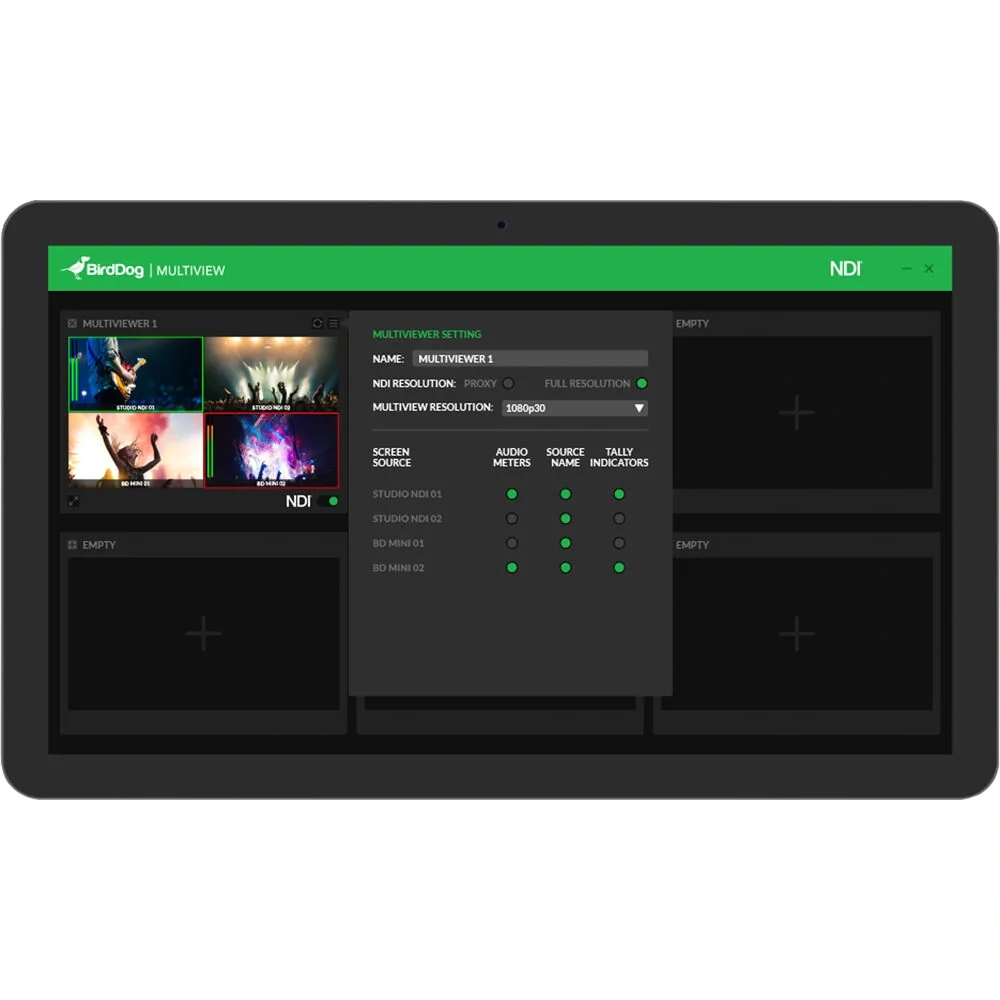
BirdDog Multiview Lite supports 6 outputs with a maximum layout of 2x2. NDI Multiview has been designed to be incredibly powerful and super intuitive to use. Create an NDI Multiview stream in a matter of seconds. Simply select the Multiview layout of your choice, select which NDI® source you want in each window, and select which overlays you wish to see. Toggle on the NDI® switch and you are sending a Multiview window out as a standard NDI® source. Yes. It really is that easy!
Key Features:
- Selectable overlays per window - Each window within NDI Multiview can have its own customised overlays. Simply toggle on or off in the setup.
- Audio Levels - VU Meters that run vertically on the left-hand side of each window.
- Tally - BirdDog's signature tally border overlays.
- Source Labels - Select the NDI Source name to display at the bottom of the window.
- 24 sources in Lite - NDI Multiview Lite has maximum of six 2x2 windows for a total of 24. That's a lot of NDI flying around the place but don't worry, we never cross the streams
- Receive in software or hardware - Multiview outputs a standard NDI stream per window which can be received on any Mac or PC running NDI Tools, any NDI compatible software based switcher, or use a BirdDog NDI Decoder to send back out to baseband video.
- Compatible with Central - The NDI Multiview outputs are a standard NDI stream you can use Central Pro or the free Central Lite to route the streams to BirdDog NDI Decoders.
- Full Screen Local Preview - Once you have decided upon your layout and overlays you can view that Multiview on your local machine.
- Audio Track Selector - Select an audio track from any of the NDI inputs to send with the NDI Multiview.
- Supports 6 outputs with a maximum layout of 2x2
- Create an NDI Multiview stream in a matter of seconds
- Toggle on the NDI® switch and you are sending a Multiview window out as a standard NDI® source
Description
BirdDog Multiview Lite supports 6 outputs with a maximum layout of 2x2. NDI Multiview has been designed to be incredibly powerful and super intuitive to use. Create an NDI Multiview stream in a matter of seconds. Simply select the Multiview layout of your choice, select which NDI® source you want in each window, and select which overlays you wish to see. Toggle on the NDI® switch and you are sending a Multiview window out as a standard NDI® source. Yes. It really is that easy!
Key Features:
- Selectable overlays per window - Each window within NDI Multiview can have its own customised overlays. Simply toggle on or off in the setup.
- Audio Levels - VU Meters that run vertically on the left-hand side of each window.
- Tally - BirdDog's signature tally border overlays.
- Source Labels - Select the NDI Source name to display at the bottom of the window.
- 24 sources in Lite - NDI Multiview Lite has maximum of six 2x2 windows for a total of 24. That's a lot of NDI flying around the place but don't worry, we never cross the streams
- Receive in software or hardware - Multiview outputs a standard NDI stream per window which can be received on any Mac or PC running NDI Tools, any NDI compatible software based switcher, or use a BirdDog NDI Decoder to send back out to baseband video.
- Compatible with Central - The NDI Multiview outputs are a standard NDI stream you can use Central Pro or the free Central Lite to route the streams to BirdDog NDI Decoders.
- Full Screen Local Preview - Once you have decided upon your layout and overlays you can view that Multiview on your local machine.
- Audio Track Selector - Select an audio track from any of the NDI inputs to send with the NDI Multiview.
- Supports 6 outputs with a maximum layout of 2x2
- Create an NDI Multiview stream in a matter of seconds
- Toggle on the NDI® switch and you are sending a Multiview window out as a standard NDI® source